Tampilkan postingan dengan label Android home. Tampilkan semua postingan
Sabtu, 07 Mei 2016
Minggu, 17 Mei 2015
Minggu, Mei 17, 2015
Dipto
Android home, Game Online, Tips dan Trik
1 comment

Clash of Clans bisa disebut sebagai games Android terpopuler saat ini. Sudah lebih dari 100 juta unduhan yang terjadi hingga sekarang, ditambah lagi dengan
dukungan berbagai model device, seperti Android, iPhone dan iPad, membuat namanya semakin tenar.
Namun, dari 100 juta Clasher (sebutan untuk pemain Clash of Clans), tidak semuanya tau bagaimana cara bermain Clash of Clans yang baik dan benar, bahkan banyak di antara mereka yang gagal dalam membangun pertahanan untuk desanya.
1. Jangan Terlalu Buru-buru Upgrade Town Hall
Ini adalah kesalahan yang paling sering ditemukan, banyak para pemain Clash of Clans yang terlalu terburu-buru untuk meng-upgrade Town Hall-nya. Lebih baik, kamu upgrade dulu komponen lainnya, seperti Mortar, Archer Tower hingga Gold Storage hingga level tertinggi pada Town Hall tersebut.
Karena jika kamu memaksakan diri untuk naik ke Town Hall lebih tinggi namun defense kamu masih level bawah, Maka kamu akan sangat mudah diserang, dan dengan otomatis base kamu akan jadi tidak berarti. Clasher seperti ini banyak disebut sebagai Prematur Player.
2. Simpan Gems, Jangan Digunakan Kalau Tidak Penting
Gems bisa kamu gunakan untuk melakukan segala hal di Clash of Clans, mulai dari mempercepat proses produksi hingga membeli resources. Namun, jangan tergiur untuk menggunakan Gems yang kamu miliki hanya karena waktu durasi yang lama.
Itulah Clash of Clans, permainan yang didesain bukan untuk dimainkan seharian berturut-turut, rileks, cari kegiatan lain untuk mengisi waktu luang sambil menunggu proses kontruksi selesai.
Saran Pemakaian Gems:
Fokus pertama penggunaan dari Gems yang terkumpul adalah untuk membeli Builders Hut. Dengan menambah Builders Hut, kamu dapat mempercepat proses kontruksi pada setiap bangunan dan senjata.3. Ketika Kamu Diserang, Jangan Langsung Menyerang Balik
Sebagai Clasher, kamu harus pintar dalam mengatur strategi, pelajari dulu kenapa penyerang tersebut memilih kamu sebagai target. Perhatikan dari mana sisi serangan dimulai dan Troops apa saja yang penyerang gunakan.Perhatikan:
- Apa yang penyerang incar? Town Hall atau hanya Sekedar Farming?
- Seberapa banyak Troops yang dikeluarkan?
- Sisi penyerangan dimulai dari mana?
Setelah kamu menganalisa ketiga hal tersebut, buatlah kesimpulan tentang apa yang harus kamu lakukan terhadap formasi base kamu, lakukan perbaikan sesegera mungkin.
4. Shield Masih Panjang? Jangan Nyerang Dulu
Setelah base kamu diserang, secara otomatis kamu akan mendapatkan Shield, yaitu sebuah pertahanan agar tidak bisa diserang oleh pemain lain dalam waktu tertentu. Biasanya antara 6 Jam, 12 Jam dan 16 Jam, tergantung seberapa parah kerusakan yang ditimbulkan.
Sebaiknya, gunakan waktu aman tersebut untuk mengoptimalkan konstruksi dan produksi kamu, seperti membenahi formasi hingga melakukan upgrade senjata, seperti Mortar, Bomb Canon, Archer Tower atau Wizard Tower.
5. Belajar Untuk Membuat Formasi Base yang Kuat
Beda Town Hall berbeda pula formasi base-nya, oleh karena itu, cobalah untuk membuat formasi base yang benar-benar kuat, hindari serangan dari segala arah, letakkan komponen berharga seperti Town Hall, Gold Storage, Elixir Storage pada tempat yang aman.Sabtu, 13 Desember 2014
Sabtu, Desember 13, 2014
Dipto
Android home, Fakta Unik, Ponsel, Software
No comments
Virus di Android memang sangat sedikit, hampir tidak terdengar, tapi baru-baru ini ditemukan lagi virus komputer dengan nama Trojan.Droidpak yang menginfeksi komputer dan mampu membahayakan OS Android, benarkah? oke, kita bahas duluCara Kerja Trojan.Droidpak
Trojan.Droidpak pertama-tama bersarang di PC Windows dengan menciptakan file XTL dan me-register service baru di regedit "HKLM\SYSTEM\CurrentControlSet\Services\flashmx" berupa ekstensi .xtl (kalo gak salah) agar tetap aktif di memori biarpun komputer mengalami re-boot. Ia kemudian mengunduh file APK yang diletakkan di %Windir%\CrainingApkConfig\AV-cdk.apk (biasanya ke-detect sebagai Android.Fakebank.B) untuk dipasang secara diam-diam ke perangkat Android yang terhubung ke PC bersangkutan.Tingkat bahaya Trojan.Droidpak
Hal tersebut bisa dilakukan apabila gadget Android yang terhubung menjalankan mode USB Debugging. Trojan.Droidpak kemudian membikin aplikasi Google Play Store palsu di gadget terinfeksi, lengkap dengan icon yang sama dengan toko aplikasi Google tersebut, tapi namanya sedikit berbeda, yaitu "Google App Store". Symantec turut menemukan bahwa malware ini mencari aplikasi online banking tertentu asal Korea Selatan, lalu berupaya menghapus serta menggantinya dengan versi lain yang sudah terinfeksi.Trojan.Droidpak juga mencegat pesan-pesan SMS yang dikirimkan dari perangkat dan mengirimnya ke server kendali. Dari hal ini, bisa disimpulkan malware tersebut memiliki motif finansial atau bertujuan mencuri uang.
Penjelasan tentang Trojan.Droidpak
Umur Trojan ini masih jagung banget, sekitar 20 Januari 2014 lalu, penyebaran virus ini sangat lemah banget, dengan sistem Antivirus standar sekarang yang ada di Windows, tentu sebenernya sudah aman, selain itu juga ancaman bahaya nya rendah secara server kendali yang dimaksud sebelumnya sudah mati, dan cara mengatasinya pun mudah, tinggal scan via antivirus di market dan beres aja.Tentu gak menutup kemungkinan pengembang virus nya berhenti sampai disitu, kalo kurang canggih ya bikin lagi, Androiders Mania juga gak boleh lengah walaupun OS Android salah satu yang kebal virus, tapi gak ada Sistem yang 100% sempurna, ya kan?
Sabtu, Desember 13, 2014
Dipto
Android home, Software
No comments
BBM Terbaru di bulan November 2014 kini mendapat dua fitur terbaru yaitu 'Times Messages' dan 'Retract Messages' , Dua fitur ini berhubungan langsung dengan Chat di BBM, tampak bahwa kali ini fitur di BBM semakin lengkap dan keren.
Fitur Retract Messages ini fungsi nya kalo kita gak sengaja ngirim pesan, maksudnya kita gak ada maksud mengirim pesan itu dan ingin menghapusnya tanpa dibaca oleh penerima, caranya gampang, tingal tekan dan tahan, maka akan muncul menu 'Retract' pilih dan pesan pun hilang.
Kemudian ada lagi fitur yang menurut saya kurang begitu penting tapi boleh juga, yaitu Timed Messages dimana kita bisa mengatur timer untuk mengontrol seberapa lama pesan atau gambar yang kita kirim dilihat dan melakukan "self-destruct" alias menghancurkan sendiri.
Ini berarti pesan tersebut punya batas waktu khusus untuk bisa dibaca oleh penerima. Perlu diketahui kalo BBM yang bisa dikirimi pesan dengan pengaturan tersebut juga harus memiliki aplikasi BBM versi terbaru november 2014 ini, kalo enggak ya bakalan gagal dan tidak terkirim.
Senin, 22 Juli 2013
Senin, Juli 22, 2013
Dipto
Android home, Download, Ponsel, Tips dan Trik
6 comments
Nama File : PES ( Pro Evolution Soccer) 2012
Version : 1.0.5
Genre : Sports
Platform : Android
File Type : Apk, Rar
File Size : 185 Mb
Status : Sudah Di Root
PES ( Pro Evolution Soccer) 2012 - Seperti yang kita ketahui,games PES2012 ini merupakan game produksi Konami,Game ini merupakan game favorit saya di PS3,nah kali ini game PES2012 ini akan saya bagikan untuk sobat pengguna ponsel Smartphone sobat yang lagi Booming saat ini yaitu Android. Walau game ini sudah jadul,yaitu PES2012 tidak apa-apa ya?? Barang kali pengunjung setia blog ini membutuhkannya dan ingin mencoba nya .
Nah mungkin untuk menggunakan game ini sobat pasti akan mengalami "Failed to get license validation" tapi tenang kali ini sahabatkudhen akan kasih solusinya yang saya dapet dari blognya kang Putra.
Baiklah sebelum ke tutorial siapkan dulu bahan bahannya :
1. Download PES2012 v1.0.5 Apk
2. Download Data Pes2012 v1.0.5
3. Download Lucky Patcher 2 8 4-1.apk
Setelah di download mari kita lanjuuuuutt ke tahap selanjutnya :
1. Install PES2012 v1.0.5 Apk
2. Copy folder "com.konami.pes2012" ke 'sdcard/Android/obb/disini'
3. Buka Game & Tunggu sampai Installing Selesai
Eittsss setelah itu jangan dibuka dulu Games nya,karna sobat akan mengalami "Failed to get license validation" Nah untuk itu sulusinya adalalah :
1. Instal Lucky Patcher 2 8 4-1.apk ( konektivitas internet dalam keadaan mati )
2. Buka Lucky Patcher.
3. Lalu Tap lama aplikasi yang ingin di patch lalu pilih "patch menu"
4. lalu tap "remove license validation"
5. lalu tap lagi auto mode. Setelah selesai Buka PES2012 yang sudah di install dan mainkan.
Keterangan :
* Jika terdeteksi license failed lagi, maka gunakan lucky patcher kembali.
* Cara diatas hanya berguna pada HH Android sobat yang sudah di Root.
* Jika ada pertanyaan silahkan berkomentar..
* Buat yang gak mau ribet sobat bisa menggunakan PES 2012 v1.0.4 nya..Disini
Rabu, 26 Juni 2013
Rabu, Juni 26, 2013
Dipto
Android home, Download, Ponsel, Software
No comments
Kali ini saya akan posting atau berbagi aplikasi Android. Yaitu Youtube Downloader. Mungkin anda pasti tidak asing dengan Youtube. Sayangnya, kita harus streaming saja dan tidak dapat mengabadikannya di android kita. Namun, aplikasi berfungsi seperti IDM di komputer untuk mengunduh video di PC. Tenang, saya akan bagikan aplikasi ini dari drive saya. Dan silahkan download, karena gratis dan sementara aplikasi ini tidak ada di Play Store.Link download: here
Cara menginstallnya:
-Centang izinkan instalasi non-Market pada Pengaturan Aplikasi
-Install seperti biasa dari file manajer
-Selesai!
Kamis, 20 Juni 2013
Kamis, Juni 20, 2013
Dipto
Android home, Download, Tips dan Trik
No comments
Have you ever lost your Original ROM? If you were me, you've done it. In the past, I tried to install custom rom named Repencis, from Indonesia. But, unfortunately, I red and followed the instructions are true--the rom was installed, but my Stock ROM was lost. I didn't back up my ROM. So, the goal of this article is show you to save your stock ROM. Now check this out!
1. Recovery & pass
2. Download tool for backup ROM
3. Put cwm_recovery.zip into the sd card put it out of the folder(not in the folder)
4. Turn off your phone by touching power, volume up, and home together (for galaxy y, if your phone isn't galaxy, please open <-this link)
5. select apply from sdcard> CWM_recovery.zip>backup and restore>backup
6. Wait until finish and restart your device
7. Done!
Risk is on yourself
1. Recovery & pass
2. Download tool for backup ROM
3. Put cwm_recovery.zip into the sd card put it out of the folder(not in the folder)
4. Turn off your phone by touching power, volume up, and home together (for galaxy y, if your phone isn't galaxy, please open <-this link)
5. select apply from sdcard> CWM_recovery.zip>backup and restore>backup
6. Wait until finish and restart your device
7. Done!
Risk is on yourself
Kamis, Juni 20, 2013
Dipto
Android home, Download, Software
No comments
Hi Guys
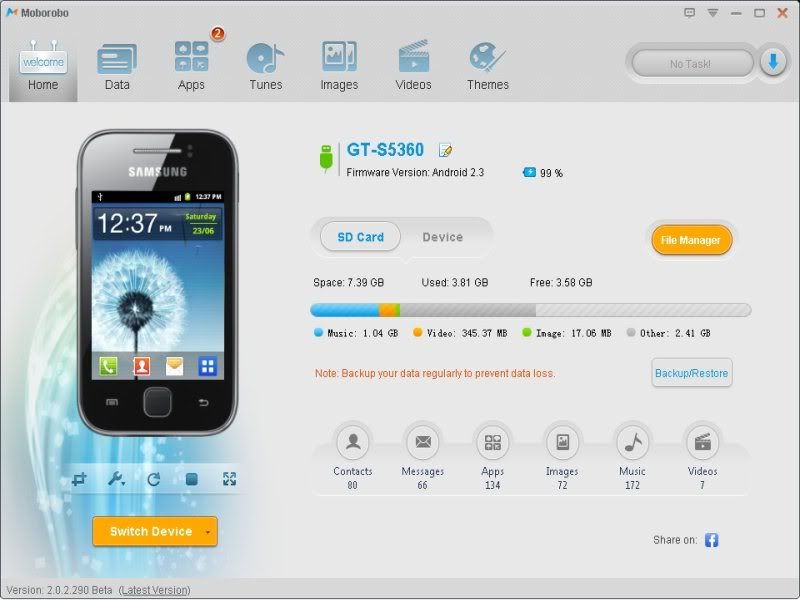
I am here, to present you a cool software that will work just like PC suite for your android phone. Actually, I am a Samsung Galaxy Y GT-5360 user. So I tried this software personally, & just loved it !
One of the unique feature, I observed in this software is realtime preview of your phone. You can see what you are doing in the phone in the PC. Actually, I guess this feature uses screenshot service of the Android.
Moborobo
Features :
-Backup/Restore contacts, messages, call logs, apps, files...
-Update apps on the phone, using internet of PC
-Install/Uninstall apps
-Manage videos, images, songs on the phone
-Download various themes
-File management
Download :
www.moborobo.com
I am here, to present you a cool software that will work just like PC suite for your android phone. Actually, I am a Samsung Galaxy Y GT-5360 user. So I tried this software personally, & just loved it !
One of the unique feature, I observed in this software is realtime preview of your phone. You can see what you are doing in the phone in the PC. Actually, I guess this feature uses screenshot service of the Android.
Moborobo
Features :
-Backup/Restore contacts, messages, call logs, apps, files...
-Update apps on the phone, using internet of PC
-Install/Uninstall apps
-Manage videos, images, songs on the phone
-Download various themes
-File management
Download :
www.moborobo.com
Kamis, 06 Juni 2013
Kamis, Juni 06, 2013
Dipto
Android home, Ponsel, Tips dan Trik
No comments
Anda telah mencharge HH anda selama berjam-jam tanpa menghiraukan pesan "Baterry is Fully Charged"?. Sebaiknya anda hentikan kebiasaan itu (apabila terbiasa). Mengapa? Karena baterai HH yang dicharge terus-menerus dan melewati batas penuhnya akan berakibat fatal. Apakah itu? Baterai HH akan menggelembung dan memboroskan baterai anda.Misalnya, baterai 100% turun menjadi 91%.
Setelah browsing, saya menemukan cara-caranya berikut: ( Apabila terjadi kesalahan pada hardware maupun software HH anda, saya tidak bertanggung jawab )
1. Siapkan plastik yang telah dilubang
2. Masukkan baterai hp anda ke dalam plastik yang telah dilubangi
3. Masukkan ke dalam kulkas selama 2-3 hari
4. Coba!
Sekali saya tidak bertanggung jawab atas kerusakan hardware handphone anda. Terima kasih.
Setelah browsing, saya menemukan cara-caranya berikut: ( Apabila terjadi kesalahan pada hardware maupun software HH anda, saya tidak bertanggung jawab )
1. Siapkan plastik yang telah dilubang
2. Masukkan baterai hp anda ke dalam plastik yang telah dilubangi
3. Masukkan ke dalam kulkas selama 2-3 hari
4. Coba!
Sekali saya tidak bertanggung jawab atas kerusakan hardware handphone anda. Terima kasih.
Senin, 03 Juni 2013
Senin, Juni 03, 2013
Dipto
Android home, Komputer
No comments
Now, I'm gonna tell you. How to share your wifi from Android devices. If you've never knew how to do it, Let's read this article:
1.You must activate your mobile data ( if you don't turn it on, you can't access internet) I prefer you use internet package.
2. Back to wifi and internet settings, please click Tethering and portable hotspot.
3. Then, put tick on Portable Wi-fi hotspot as I show on this picture:
Sabtu, 02 Maret 2013
Sabtu, Maret 02, 2013
Dipto
Android home
No comments
Hi Guys waiting is over presenting NEMESIS ONE [THE MOST ADVANCED CUSTOM ROM FOR GALAXY Y] released by a Recognized Contributor at XDA Forum know as AvijitGhosh82.The best ROM EVER built for Galaxy Y.
With superb themes, revamped UI, a brand new Launcher, Android 4.2 status bar and the fastest kernel out there, it’s simply what you ever wanted.
THE ANDROID 4.2: With Nemesis One, get the originality of Android 4.2 Jelly Bean on your phone. See your Little Young transform into Google Nexus. It has-the unique Nemesis Launcher-a complete replica of the Jelly Bean Launcher, the JB Framework, the JB Settings, Task Manager, File Explorer and the Android 4.2 Status Bar, JB Apollo Music and lots more-get the taste of Jelly Bean in everything with Nemesis. So, Samsung, you won’t give us an update? Looks like we don’t even need it now!
THE BUTTERY-SMOOTH, ROCK-SOLID AND ION-STABLE UI: With Nemesis, get your phone work on the smoothest framework ever. You get no lag, no FC, no Error. Young will really be young and run flawlessly. The silky smooth transitions and animation of apps-This indeed is something which will charm you!
THE NEMESIS FUSION KERNEL: With Nemesis One, get the fastest and the most stable kernel ever made. The one and only Nemesis Fusion-enriched with features like Swap, BusyBox, EXT2/3/4 and other super kernel scripts. One thing everybody would long for is good Battery Saving-you’ll be glad to know that the Nemesis Fusion can be considered one of the best battery saving kernels for our device and can maintain battery well for 24 HRS even if you play with it ALL THE TIME!
MUSIC-A FOOD OF LIFE: Nemesis features an unique all-in-one Audio Booster-Get the ALSA, BEATS EQUALIZER, DOLBY DIGITAL3D SURROUND SOUND, DSP MANAGER, SONY xLOUND Audio Enhancement and lots other sound boost tweaks. Apollo Music Player-the best music player as of now is included. So turn your little young into an iPod. Play your music like never before. Enjoy the greatest music with your family and friends, with Nemesis One.
TWEAKIES AND TWEAKIES! EVERYWHERE: Nemesis One features loads of tweaks to get the best out of your phone. There are as many as 50 build.prop and 15 init.d tweaks. Get the most renowned built-in Kernel tweaks with Nemesis Fusion. You get the greatest tweaks like Adrenaline-Engine, Sony Cybershot Mod, complete Kuro Tweaks, Built-in Adblockers etc. etc.
So, get ready, to, gear up, pace up, enjoy- the best ROM ever made, on your Galaxy Y!!!!
Minggu, 07 Oktober 2012
Minggu, Oktober 07, 2012
Dipto
Android home, Download, Tips dan Trik
1 comment
Screenshots


Based on DDLC3, but work on DXLB-DXLE too
ChangeLogs
Whats in Creeds' Fusion v3.0??
Basic Features Like:
-Root-(SU Access)
-Deodex
-ZipAligned
Other Stuffs:
-Creeds' Home v2.0 ~Hot
5 Docks
Auto Alphabetical Arrangement
4x4 Icons on one Page of Menu
(So You Get Total Of 21 Apps on one Page Instead Of Stock 16)
Infinite Home Screen Loop Removed
Upto 9 HomeScreens
Page Indicator At Bottom
Whole New Touchwiz UI
List View
Apps Background in List View
-System Themed Lunar UI
-Other Icon Packs of Lunar UI
-Swipe to Remove Notification
-Custom Bootanimation Enabled
-Creeds' Signature Animations and other UI's
-Transparent UI Look
(You Can see Live Wallpapers/Wallpaper behing all apps)
-Transparent Lockscreen
-Status Bar Mods (Use EDT App)
Change Clock Colours to your wish
Change Battery Style to Your Wish
Battery Percentage Optional
Add Your Custom Text On Status Bar
-Lidroid 14 Toggles
Use Quickpanel Settings to Toggle and Change Sequence (Optional,not included in rom)
Enabled Overscroll Mod in Toggles Area
Smaller Toggle area with no text or indicators like Cyanogen
-Using MIUI Music Player
-Keyboard Bug Fix from version 2.5 on transparent UI
-Smooth Scroll
-Minor Bloatwares Removed
Changes in Fusion v3.1
-This is a Common Bug Fix Update of 3.0 .Dont Update if You Dont Have any Problems Using v3.0.
-Apps Top Borders Fixed
-3x4 Keyboard Fix
-Added ICS Keyboard
-Some more, dun remember now
Changes in Fusion v3.2
-Creeds Parts ~Hott
-Battery History,Information & Statistics via Creed Parts
-FlipMute for Incoming Calls via Creed Parts
-Window/Transition Animation Speed Set & Font Size Selection via Creed Parts
-Status Bar Toggles Selection/Order via Creed Parts
-Samsung Secret Codes , Startup Manager System App Mnager via Creed Parts
-Lockscreen Selection via Creed Parts
-Unlock Via Menu Key via Creed Parts
-Lockscreen Gestures and Custom Apps On Lockscreen via Creed Parts
-15 Status Bar -Added Wifi Hotspot
-8 Lockscreen Mod including:
CyanogenMod Sliding Tab Unlock
CyanogenMod Ring Unlock
CyanogenMod Lens Unlock
CyanogenMod Rotatory Unlock
CyanogenMod Rotatory Revamped Unlock
Samsung Circle Unlock
Samsung Sliding Tab Unlock
Samsung Circle Unlock
-Smooth Scrolling (Scrolling Cache Disabled)
-Creeds Home Improved
-Some Bloatware Removed
Changes in Fusion v3.5
-All the Major Problems Fixed (USB Lockscreen Problem + Signal Bars Problem)
-New UI Inspired from both Touchwiz and ICS
-Improved Status Bar Mods
-Battery Bar Options
-Options to Choose Battery Bar Height
-Battery Bar Color/Transarency Customizable
-Signal/Battery Text Options
-Custom Fonts Available for Clock and Signal Texts
-New Improved Touchwiz Launcher (Full Credits : zcop)
-5 Docks With Landscape Support
-System Performance Improves
-New Animations
-Much More Stable than Previous Versions
-Improved MMS app with theme support
-No Receipient limit on Message App
-No Auto SMS to MMS Coversion
4. Lakukan Data Wipe.
5. Pilih "Apply update from sdcard"
6. Flash Clockwork Mod ( CWM )
Credits
AndroidOn - For Smooth Scrolling by Disabling Scrolling Cache
Lidroid-For the 15 Status Bar Toggles
Lidroid-For Flipmute/Lockscreen Mod and More
Parasami-For Some reference to LockscreenMod
CyanogenMod Team -For their Lockscreen and Some More Settings
RomanBB For the StatusBar Tweaks
R3DX For the Lunar UI Theme


Based on DDLC3, but work on DXLB-DXLE too
ChangeLogs
Whats in Creeds' Fusion v3.0??
Basic Features Like:
-Root-(SU Access)
-Deodex
-ZipAligned
Other Stuffs:
-Creeds' Home v2.0 ~Hot
5 Docks
Auto Alphabetical Arrangement
4x4 Icons on one Page of Menu
(So You Get Total Of 21 Apps on one Page Instead Of Stock 16)
Infinite Home Screen Loop Removed
Upto 9 HomeScreens
Page Indicator At Bottom
Whole New Touchwiz UI
List View
Apps Background in List View
-System Themed Lunar UI
-Other Icon Packs of Lunar UI
-Swipe to Remove Notification
-Custom Bootanimation Enabled
-Creeds' Signature Animations and other UI's
-Transparent UI Look
(You Can see Live Wallpapers/Wallpaper behing all apps)
-Transparent Lockscreen
-Status Bar Mods (Use EDT App)
Change Clock Colours to your wish
Change Battery Style to Your Wish
Battery Percentage Optional
Add Your Custom Text On Status Bar
-Lidroid 14 Toggles
Use Quickpanel Settings to Toggle and Change Sequence (Optional,not included in rom)
Enabled Overscroll Mod in Toggles Area
Smaller Toggle area with no text or indicators like Cyanogen
-Using MIUI Music Player
-Keyboard Bug Fix from version 2.5 on transparent UI
-Smooth Scroll
-Minor Bloatwares Removed
Changes in Fusion v3.1
-This is a Common Bug Fix Update of 3.0 .Dont Update if You Dont Have any Problems Using v3.0.
-Apps Top Borders Fixed
-3x4 Keyboard Fix
-Added ICS Keyboard
-Some more, dun remember now

Changes in Fusion v3.2
-Creeds Parts ~Hott
-Battery History,Information & Statistics via Creed Parts
-FlipMute for Incoming Calls via Creed Parts
-Window/Transition Animation Speed Set & Font Size Selection via Creed Parts
-Status Bar Toggles Selection/Order via Creed Parts
-Samsung Secret Codes , Startup Manager System App Mnager via Creed Parts
-Lockscreen Selection via Creed Parts
-Unlock Via Menu Key via Creed Parts
-Lockscreen Gestures and Custom Apps On Lockscreen via Creed Parts
-15 Status Bar -Added Wifi Hotspot
-8 Lockscreen Mod including:
CyanogenMod Sliding Tab Unlock
CyanogenMod Ring Unlock
CyanogenMod Lens Unlock
CyanogenMod Rotatory Unlock
CyanogenMod Rotatory Revamped Unlock
Samsung Circle Unlock
Samsung Sliding Tab Unlock
Samsung Circle Unlock
-Smooth Scrolling (Scrolling Cache Disabled)
-Creeds Home Improved
-Some Bloatware Removed
Changes in Fusion v3.5
-All the Major Problems Fixed (USB Lockscreen Problem + Signal Bars Problem)
-New UI Inspired from both Touchwiz and ICS
-Improved Status Bar Mods
-Battery Bar Options
-Options to Choose Battery Bar Height
-Battery Bar Color/Transarency Customizable
-Signal/Battery Text Options
-Custom Fonts Available for Clock and Signal Texts
-New Improved Touchwiz Launcher (Full Credits : zcop)
-5 Docks With Landscape Support
-System Performance Improves
-New Animations
-Much More Stable than Previous Versions
-Improved MMS app with theme support
-No Receipient limit on Message App
-No Auto SMS to MMS Coversion
Cara Installasi :
1. Install Clockwork Mod Recovery ( bisa dilihat di thread ane sebelumnya.... )
2. Download Creed'sROM dan simpan ke SD card-mu.
3. Matikan SGY-mu dan restart ke mode recovery menggunakan kombinasi tombol berikut :
Volume UP + Home Button + Power Button
4. Lakukan Data Wipe.
5. Pilih "Apply update from sdcard"
6. Flash Clockwork Mod ( CWM )
7. Pilih " install zip from sdcard >>> choose zip from sdcard "
8. Pilih " Creed's ROM v x.x " dan tunggu selama beberapa menit hingga proses installasi selesai
9. Lalu pilih " reboot system now "
10.Enjoy !!!
Creeds' Fusion v3.0 : HERE
Creeds' Fusion v3.1 : HERE
Creeds' Fusion v3.2 : HERE
Creed v3.5 : HERE
Bahan-bahan :
Creeds' Fusion v3.0 : HERE
Creeds' Fusion v3.1 : HERE
Creeds' Fusion v3.2 : HERE
Creed v3.5 : HERE
Bugs About This ROM:
Bugs in This Rom:
1.Status Bar Signals Arent Properly Shown
2.This Is a bit Major Problem(will be Sorted Soon)
-Problem Lies With the LockscreenMod All 3 Lockscreens From Smamsung Runs Fine
But When You Connect USB With any of the CyanogenMod Lockscreen Phone Hangs Badly
and then Requires a Reboot.
Patches
1.AOSP Lockscreen : Here
Credits
AndroidOn - For Smooth Scrolling by Disabling Scrolling Cache
Lidroid-For the 15 Status Bar Toggles
Lidroid-For Flipmute/Lockscreen Mod and More
Parasami-For Some reference to LockscreenMod
CyanogenMod Team -For their Lockscreen and Some More Settings
RomanBB For the StatusBar Tweaks
R3DX For the Lunar UI Theme
Minggu, Oktober 07, 2012
Dipto
Android home, Download
9 comments
Name : Kingdoms & Lords
Size : 200MB
Version : v1.3.2
System Requirement : Android 2.2+
Game Developer : Gameloft
Build your kingdom, train your army, and fight against the Dark King's minions!
In Kingdoms & Lords, the peace and quiet of your rural village are shattered by the threat of Barbarian forces. With war upon your region, you must build up your village and train your militia. But things take a turn for the worst: the Dark King has returned to power, invading every territory across the continent...
A DUAL GENRE: SIMULATION AND STRATEGY
• A strategy game: raise an army and attack your neighbors. Hire, train, and develop your army to prepare them for combat.
• A medieval simulation: expand lands, cultivate crops and raise animals to get money and food. Enjoy a rich production system to build up your kingdom.
LET YOUR FRIENDS JOIN THE FUN
• Challenge your friends by launching your troops against their defense lines and see who has the best army!
• Forge alliances, rescue friendly units, and send them unique gifts.
A TRUE ECONOMY TO MANAGE ON A DAILY BASIS
• Optimize your production system and get extra revenue.
• Upgrade your buildings, unlock new ones, and enhance your capacities.
• Invest to develop your army and upgrade their weapons.
• Protect your kingdom, defeat rival armies, and steal their resources.
Let's Play by Gameloft!
----
Visit our official site at http://www.gameloft.com
Follow us on Twitter at http://glft.co/LetsPlaybyGameloft_Twitter or like us on Facebook at http://www.facebook.com/letsplaybyGameloft to get more info about all our upcoming titles.
Check out our videos and game trailers on http://www.youtube.com/letsplaygl
Discover our blog at http://glft.co/Gameloft_Official_Blog for the inside scoop on everything Gameloft.
More Info:
https://play.google.com/store/apps/d...ANMP.GloftDKHM
Download
Apk
http://pan.baidu.com/netdisk/singlep...8694_187640487
http://kuai.xunlei.com/d/HSKDAJVCREHV?p=129852
SD Data
Location: Sdcard/ Android/obb
http://pan.baidu.com/netdisk/singlep...174_2069692113
http://kuai.xunlei.com/d/HSKDAJVCREHV?p=129852
thankz to muzhiwan for shared this games....;)
Minggu, Oktober 07, 2012
Dipto
Android home, Download
No comments

Requirements: Android 2.1+ (rooted)
Overview: FaceNiff is an Android app that allows you to sniff and intercept web session profiles over the WiFi that your mobile is connected to.
It is possible to hijack sessions only when WiFi is not using EAP, but it should work over any private networks (Open/WEP/WPA-PSK/WPA2-PSK). It's kind of like Firesheep for android. Maybe a bit easier to use (and it works on WPA2!). Please note that if webuser uses SSL this applicationwon't work.
Legal notice: this application is for educational purposes only. Do not try to use it if it's not legal in your country. I do not take any responsibility for anything you do using this application. Use at your own risk
Quick steps: With your Wi-Fi on, install FaceNiff, run it, close it and run the unlocker. After your key has been generated, you may remove the unlocker.
Note: I've successfully tested the unlocker on my device with two MAC addresses, and lohan has reported success with his device.
Download Instructions:
http://adf.ly/1495808/http://www.mediafire.com/?ulpd242wvdp8153
Langganan:
Postingan (Atom)


.jpg)
.jpg)